HTTP
▶ Non-persistent
- Single TCP
- Parallel TCP
- Problem 1) 하나를 위한 HTTP (낭비)
▶ Persistent
- Solution 1) Persistent HTTP: 한 번의 connection으로 multiple object를 전송한다.
- Problem 2) HOL(Head of Line blocking) 큰 object --> 다른 object delay
HTTP/2
- Solution 2) object를 frame으로 나눈다. --> HOL 방지
+ Server: push unrequested object to client.
+ Priority 설정 --> FCFS (x), 다른 순서 가능 - Problem 3) 하나의 object packet이 drop되면, 오류 복구 전까지 진행이 멈춘다.
<-> Non-persistent - parallel: 서로 다른 object들은 서로 다른 TCP connection을 이용하기 때문에, 방해 x - Problem 4) Security 문제
HTTP/3
- Solution 3, 4) per object error and congestion control over UDP. (unreliable transfer)
2.3 e-mail
- SMTP
- POP3, IMAP, HTTP
▶ Three major components:
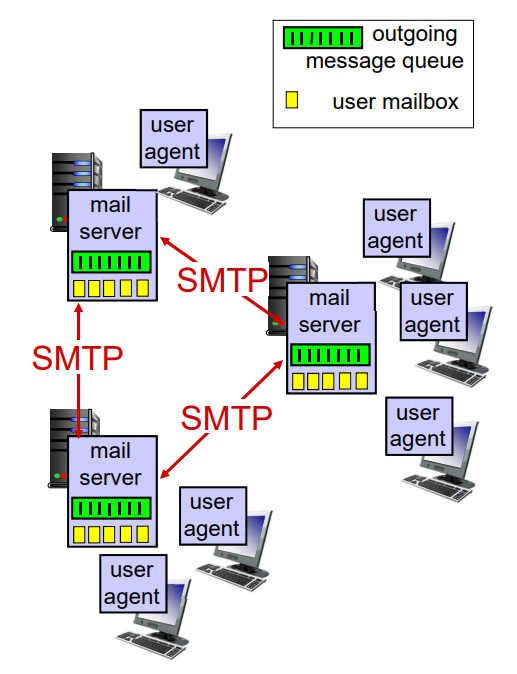
- MUA (Mail User Agent)
- MTA (Mail Transfer Agent) (= mail server)
- SMTP (Simple Mail Transfer Protocol)
Mail servers
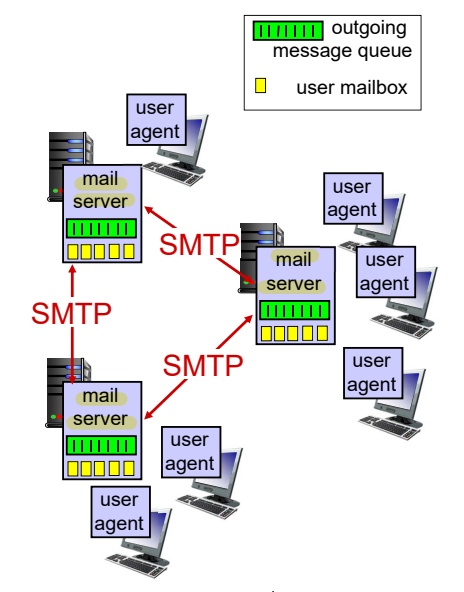
- mailbox: incoming message 보관
- message queue: outgoing message 보관
▶ SMTP: Protocol between mail servers to send e-mail messages.
- SMTP client: sending mail server
- SMTP server: receiving mail server
Cf) P2P vs. SMTP
- P2P(Peer-to-Peer): Client-Server 구조 x
- SMTP: server들끼리의 통신, sending server/receiving server
SMTP
- TCP(reliable transfer), Port 25
- Direct transfer: sending server --> receiving server
- Three phases of transfer: handshaking --> transfer of messages --> closure
- Command/Response interaction
- Commands: ASCII text
- Response: status code and phrase - Message must be 7-bit ASCII
Scenario: Alice sends message to Bob
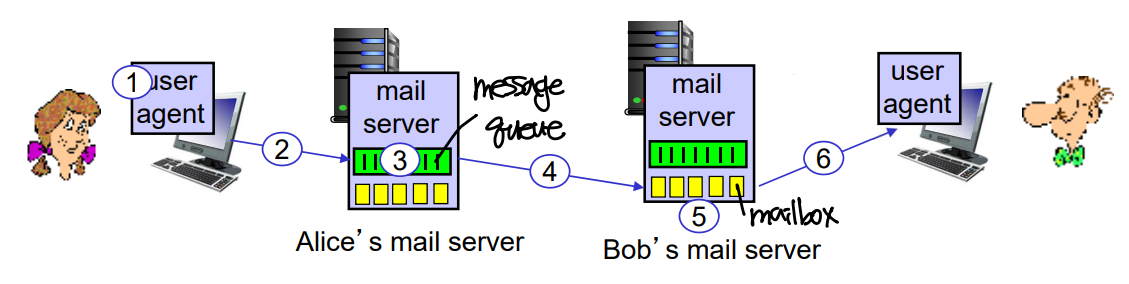
- Alice's UA sends message to Alice's mail server --> message: Alice's message queue
- Client side of SMTP opens TCP connection with Bob's mail server.
- SMTP client sends message over the TCP connection to Bob's mail server --> message: Bob's mailbox
- Bob's mail server invokes Bob's UA to read message.
▶ SMTP 사용:
- SMTP: push protocol
- Alice's UA --> Alice's mail server
- Alice's mail server --> Bob's mail server
Cf) Bob's mail server --> Bob's UA: message access protocol (POP, IMAP)
▶ Why does Alice's UA not directly sends her e-mail to Bob's mail server?
: Alice's UA는 sending을 계속 시도하지 않는다. 따라서 Alice's mail server message queue에서 maximum time trial.
▶ Who does DNS resolution for Bob's mail server?
: Alice's mail server
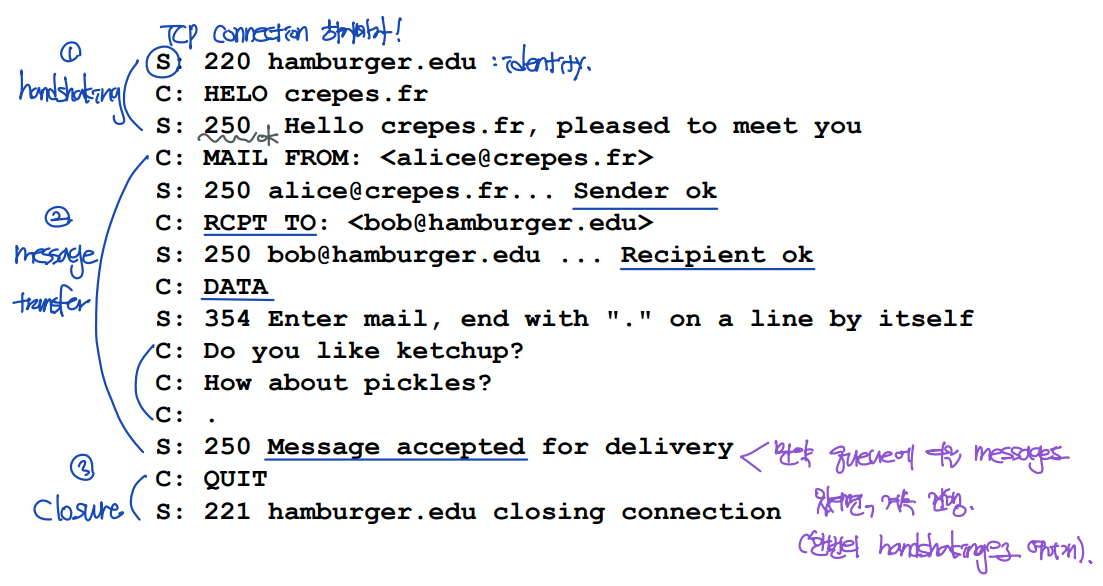
Sample SMTP interaction
- Handshaking
- Message transfer
- Closure
SMTP vs. HTTP
▶ Push protocol vs. Pull protocol
- SMTP: push protocol --> sending mail server pushes the data onto the receiving mail server by initiating a TCP connection.
- HTTP: pull protocol --> client pulls the information available on a server by initiating a TCP connection.
▶ Persistent connection vs. Non-persistent connection
- SMTP: persistent connection (message queue에 받은 message를 저장하고, 하나의 handshake로 모든 정보를 보내고 받는다.)
- HTTP: persistent connection, non-persistent connection
- HTTP/1: non-persistent connection
- HTTP/2, HTTP/2: persistent connection
▶ Port number
- SMTP: Port 25
- HTTP: Port 80
▶ Encoding format
- SMTP: 7-bit ASCII
- HTTP: Does not require binary multimedia data to be encoded in 7-bit ASCII.
▶ Object 저장 방식
- SMTP: Places all the object into a single message.
- HTTP: Places each object in its own HTTP message.
Mail access protocols
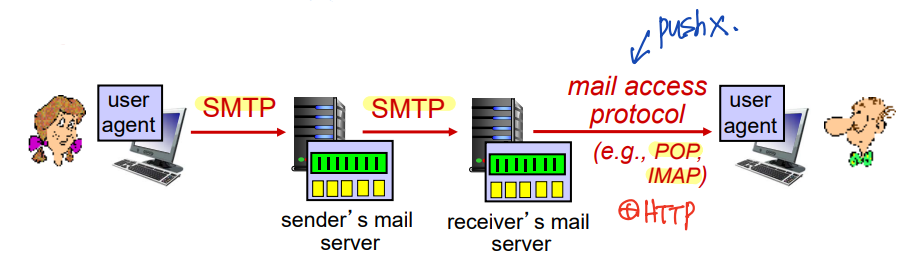
▶ SMTP: push protocol --> mail server에게 보낼 때
▶ mail access protocol --> mail server에서 보낼 때
- POP(Post Office Protocol): authorization, download
- IMAP(Internet Mail Access Protocol): 더 많은 기능 포함 (+ manipulation of stored messages; UA가 mail server의 mailbox를 organize)
- HTTP: 웹 메일
POP3 protocol
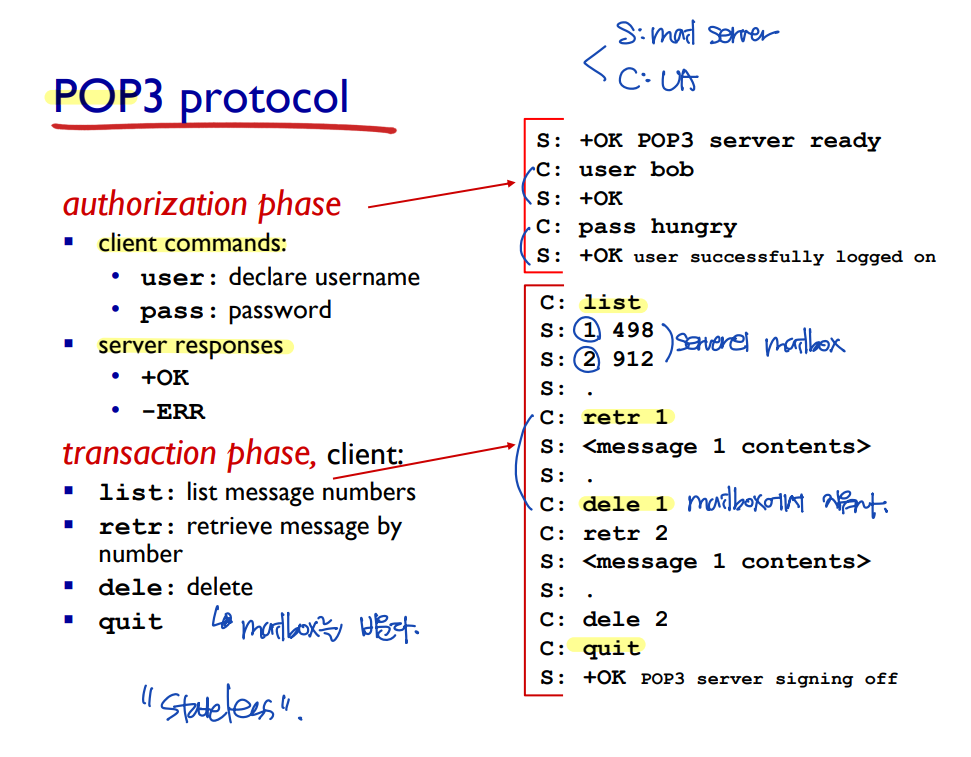
POP3 & IMAP
POP3
▶ POP3 mode
- download and delete mode: mailbox를 비운다. --> Bob cannot re-read e-mail if he changes client.
- download and keep mode: copies messages on different clients. (server의 mailbox가 비워지지 않는다.)
▶ stateless across sessions.
IMAP
- Keep all messages in one place: mail server.
- Allows UA to organize mailbox in folders.
- Keeps UA's state accross sessions.
2.4 DNS (Domain Name System)
: Domain name --> IP address
DNS sevices, structure
▶ Domai Name System:
- Distributed database
- Application-layer protocol: 모든 application에게 서비스를 제공하는 application-layer protocol. (network-layer x)
'Computer Network > 컴퓨터네트워크' 카테고리의 다른 글
| [컴퓨터네트워크] 2. Application Layer (5) (1) | 2023.10.04 |
|---|---|
| [컴퓨터네트워크] 2. Application Layer (4) (0) | 2023.09.29 |
| [컴퓨터네트워크] 2. Application Layer (2) (0) | 2023.09.28 |
| [컴퓨터네트워크] 2. Application Layer (1) (0) | 2023.09.16 |
| [컴퓨터네트워크] 1. Introduction (4) (0) | 2023.09.16 |


