MIPS
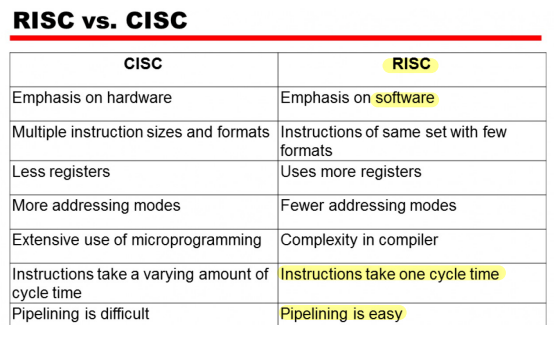
RISC vs. CISC
- RISC: Reduced Instruction Set Computer
- CISC: Complex Instruction Set Computer
MIPS R2000 CPU and FPU
- CPU
- Two coprocessors: Coprocessor 0, Coprocessor 1
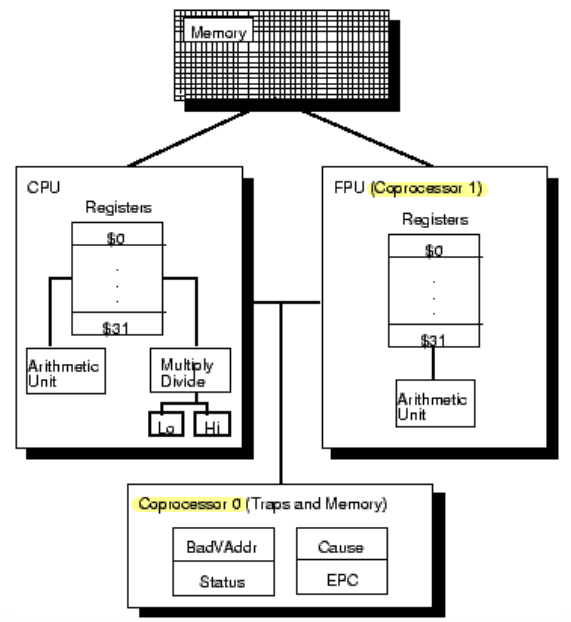
CPU (Central Processing Unit)
- ALU(Arithmetic Logic Unit): Performs arithmetic and logic operations.
- Control unit: Extracts instructions from memory and decodes and executes them, calling on the ALU when necessary.
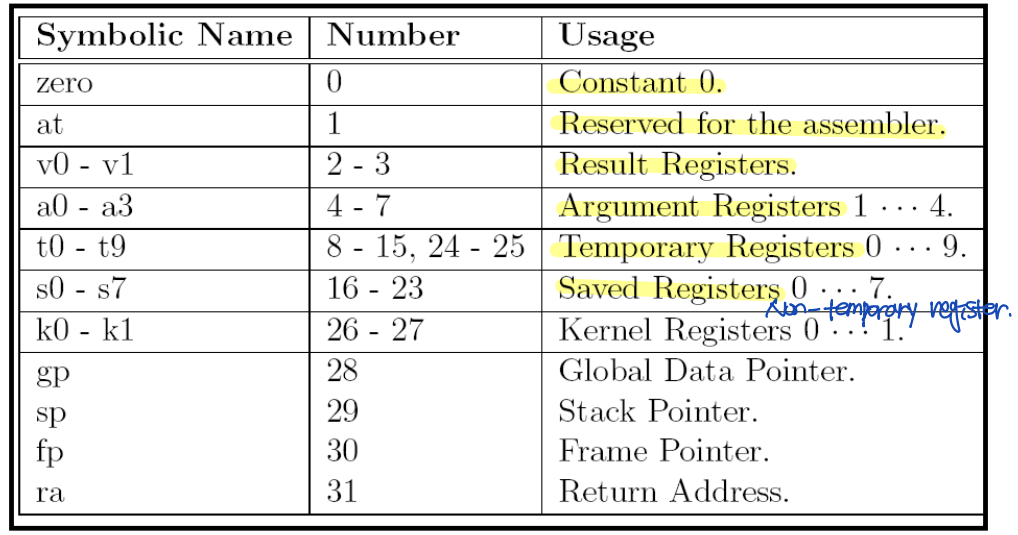
Registers
▶ MIPS --> 32 registers
- 31 of these are general-purpose registers that can be used in any of the instructions.
- The last one, denoted register "zero" is defined to contain the number zero at all times.
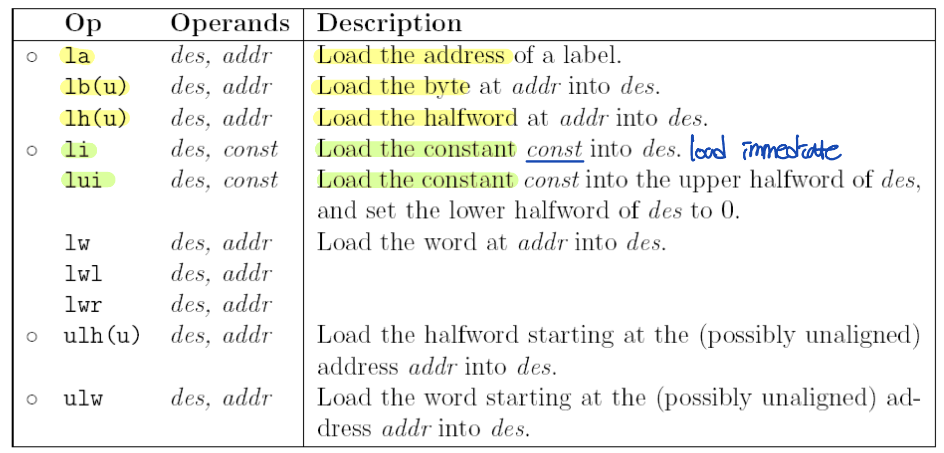
MIPS Instruction Set
- "o" --> Assembler: Traslates pseudo-instructions into one or more native instructions.
- "u" --> "unsigned"
- add: add signed
- addu: add unsigned - Operation(연산): Specifies what function to perform.
Operand(피연산자): Specifies with what a specific function is performed.
▶ MIPS operation
- Arithmetic operations (integer, floating-point)
- Logical operations
- Shift operations
- Compare operations
- Load/Store to transfer data from/to memory.
- Branch/Jump operations
- System control/Coprocessor operations
▶ MIPS operands
- General-purpose registers
- Fixed registers (예: HI/LO registers)
- Memory location
- Immediate value
MIPS Instruction
- Destination: register
- Source 1: register
- Source 2: register | 32-bit integer
- Register 2: register
- Address: memory address
Load Instructions
: Fetch a byte, halfword, word from memory and put it into a register.
- Byte: 8 bits
- Word: 4 bytes --> 32 bits
- Halfword: 2 bytes --> 16 bits
li $t1, 1 # load 1 into $t1
Arithmetic Instructions
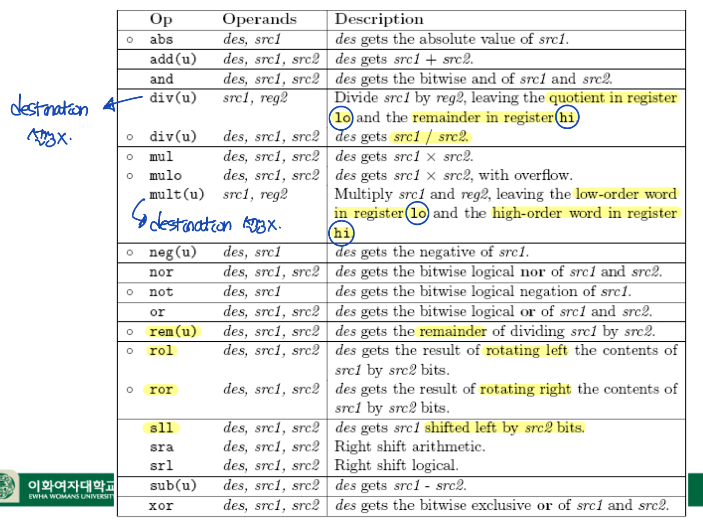
Arithmetic Examples
: <op> <destination> <source 1> <source 2>
add $t0, $s0, $s2 # $t0 = $s0 + $s2
Syscalls
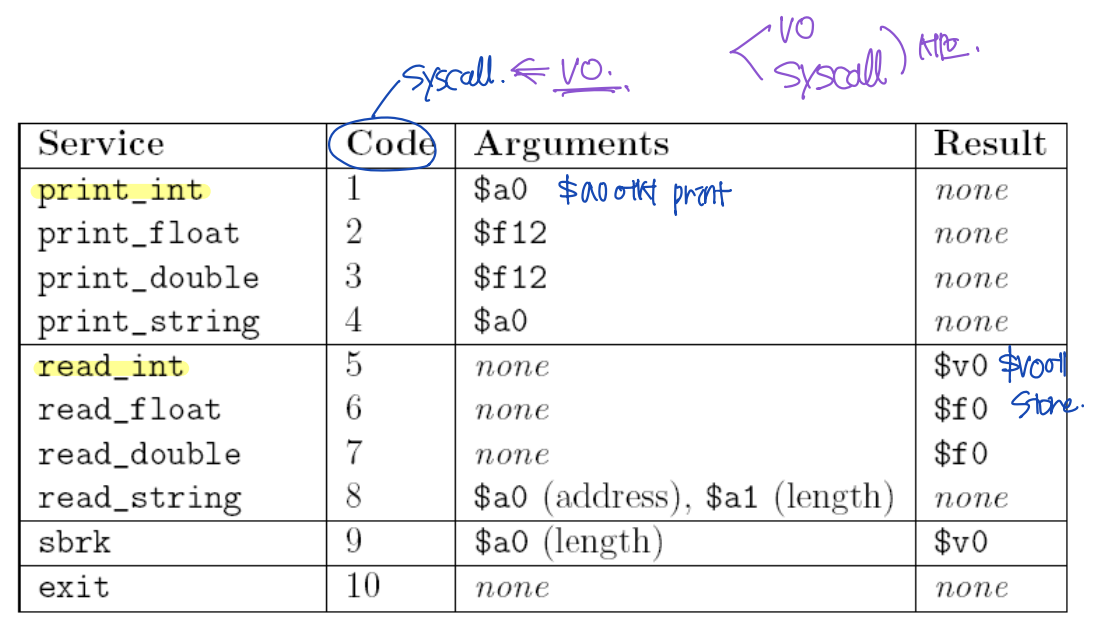
Syscalls - Example
li     $v0, 10
syscall                # v0 == 10 --> Exit
li $v0, 5
syscall # $v0 == 5 --> read_int
move $t0, $v0 # Move the number read from $v0 to $t0 (안전한 장소로 옮기는 것)move $a0, $t2 # move the number from $t2 to $a0
li $v0, 1
syscal # $v0 = 1 --> Print $a0
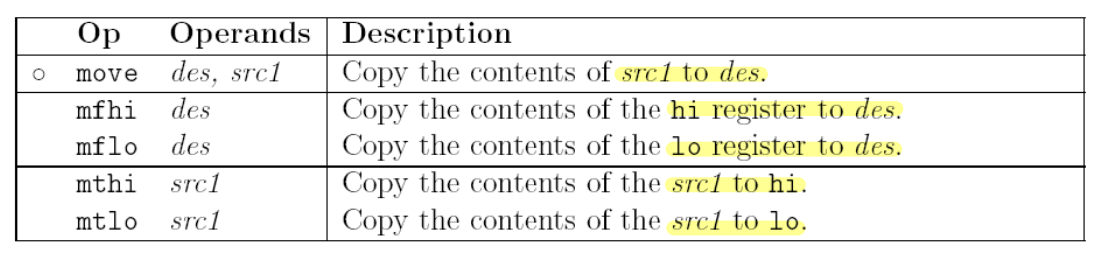
Data Movement Instructions
Program Template
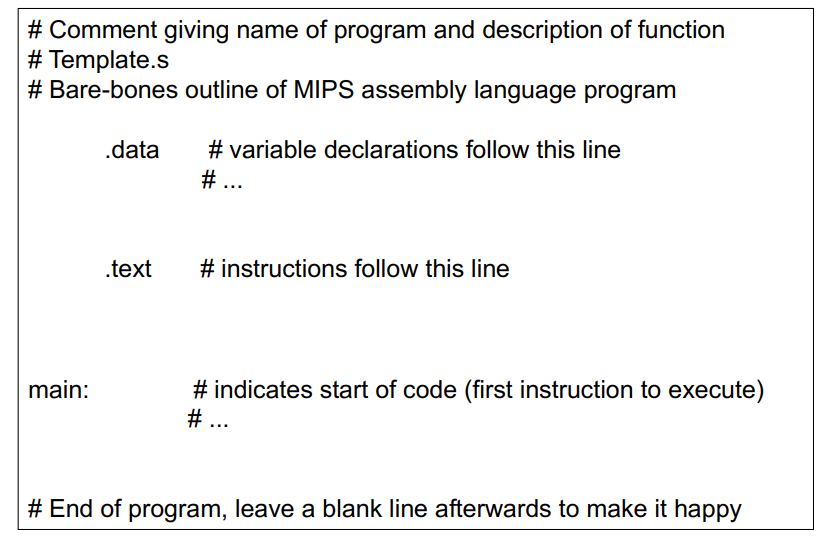
Two Sections
▶ Data: Where the variables are declared.
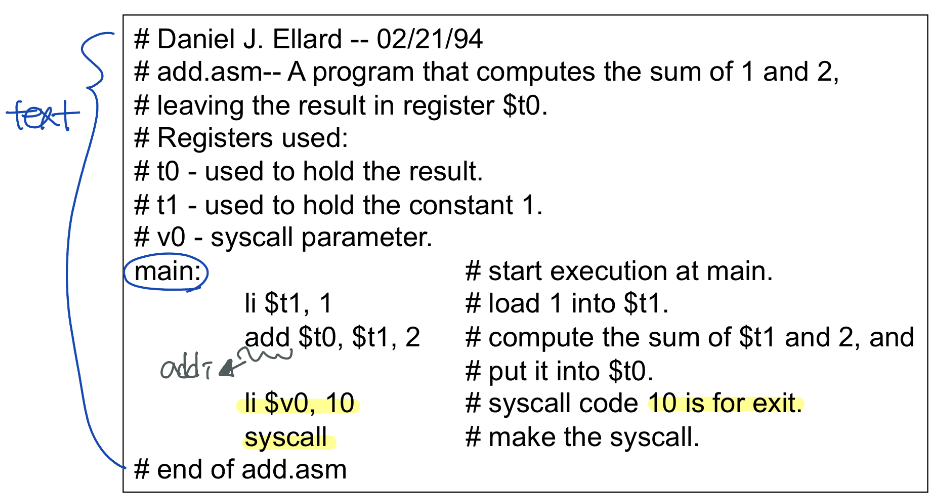
▶ Text: Instructions go here.
- Contains the beginning of the program.
Directives
: Instruction for the assembler for reserving memory, telling the assembler where to place instructions ...etc
▶ Data segment
- Tagged with the .data directive.
- Used to allocate storage and initialize global variables.
▶ Text segment
- Indicated by the .text directive.
- Where we put the instructions we want the processor to execute.
--> Assembler starts in the text segment.
Example 1
Comments
- # (pound sign)
Labels and Main
- main: Program execution begins at the location with the label "main".
** label: Symbolic name for address in memory.
Example 2
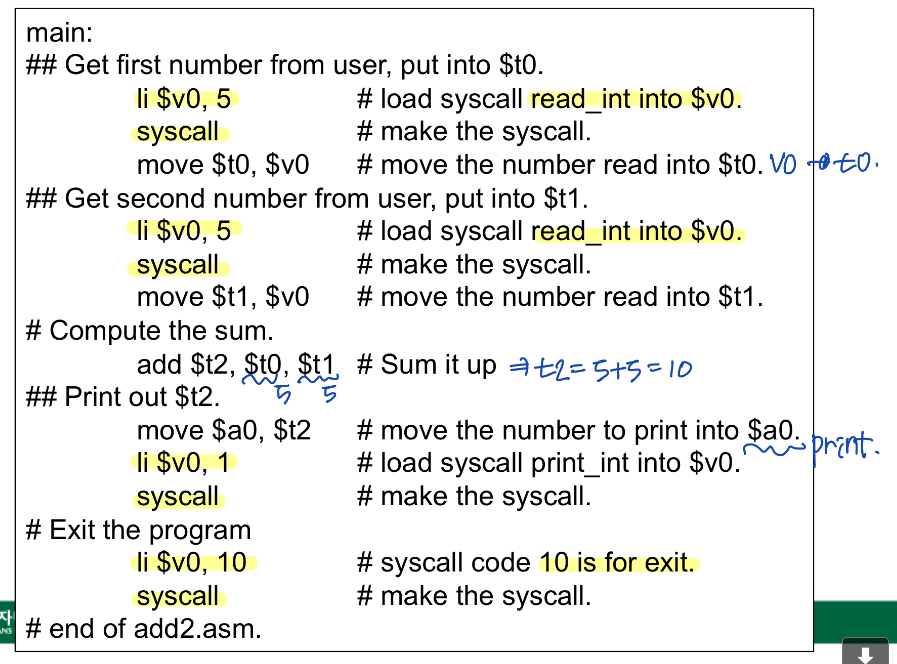
Cf) $t0 == 5, $t1 == 5라고 가정한 것
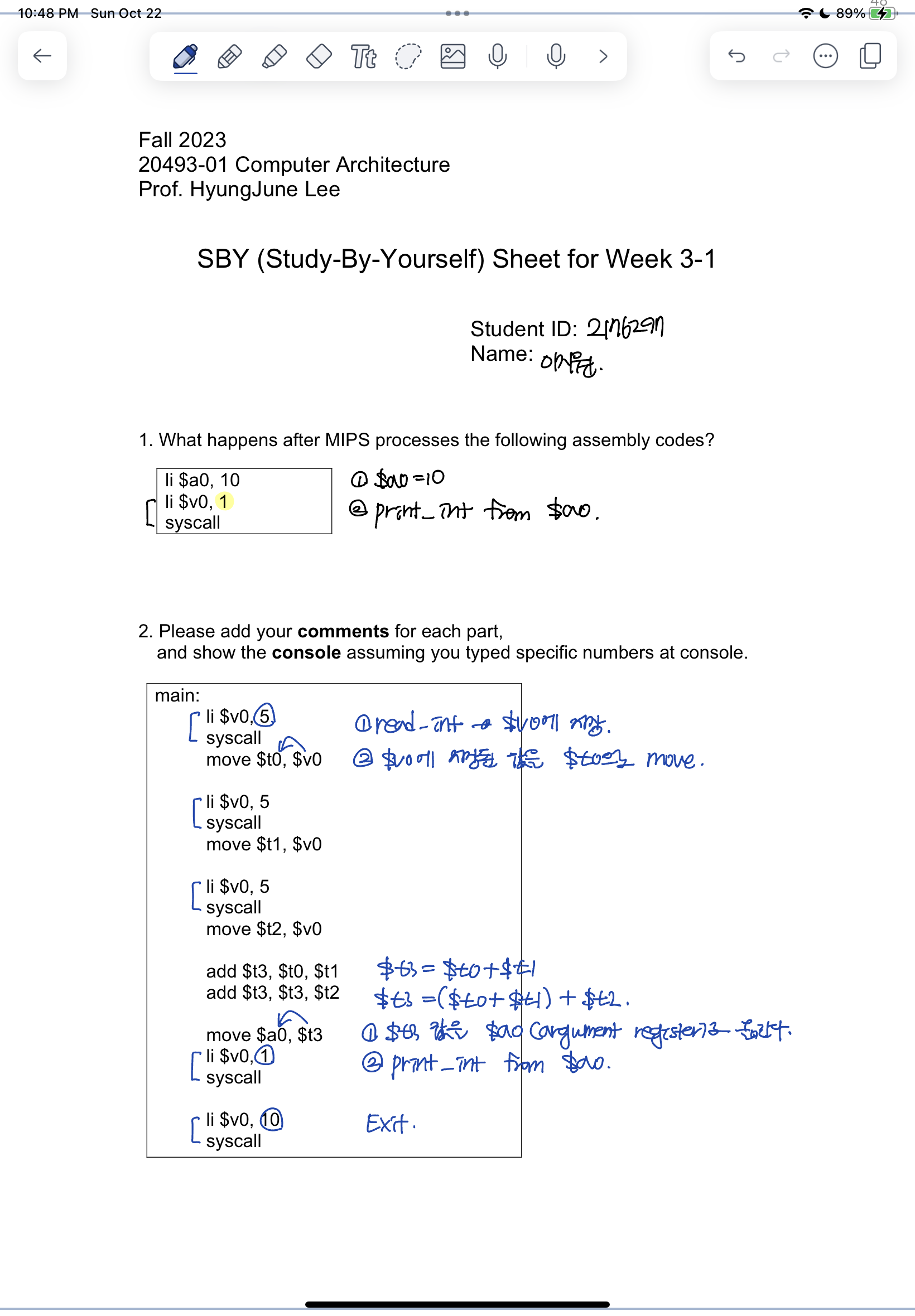
SBY 3-1
li   $a0, 10      # load_int $a0, 10
li   $v0, 1       # load_int $v0, 1
syscall           # $v0 == 1 --> Print $a0 --> Print 10
li   $v0, 5
syscall           # read_int
move $t0, $v0     # move from $v0 to $t0

li   $v0, 5
syscall           # read_int
move $t1, $v0     # move from $v0 to $t1

li   $v0, 5
syscall           # read_int
move $t2, $v0     # move from $v0 to $t2

add  $t3, $t0, $t1   # $t3 = $t0 + $t1
add  $t3, $t3, $t2   # $t3 = $t3 + $t2

move $a0, $t3     # move from $t3 to $a0
li   $v0, 1
syscall           # $v0 == 1 --> print $a0

li   $v0, 10
syscall           # $v0 == 1 --> exit
$v0 = 5 ; 상수 5를 $v0 저장하고 나서 syscall을 부르기에, $v0 = 5는 syscall code 5를 하기 위함..
사용자가 콘솔에서 입력값으로 입력한 정수값 (예를 들어, 콘솔에서 내가 15를 타이핑한 후 엔터를 쳤다면) $v0 에 이제 15가 저장이 된 후에, syscall 이후의 프로그램이 이제 실행되게 됩니다.
'Computer Architecture > 컴퓨터구조[01]' 카테고리의 다른 글
| [컴퓨터구조] 2. Instructions: Language of the Computer (4) (1) | 2023.09.25 |
|---|---|
| [컴퓨터구조] 2. Instructions: Language of the Computer (3) (0) | 2023.09.25 |
| [컴퓨터구조] 2. Instructions: Language of the Computer (1) (0) | 2023.09.13 |
| [컴퓨터구조] 1. Computer Abstractions and Technology (3) (0) | 2023.09.13 |
| [컴퓨터구조] 1. Computer Abstractions and Technology (2) (0) | 2023.09.10 |


